To access your surfboard cable modem open your web browser and use the IP address of 192.168.100.1. If your router has the same IP address you will have to change your LAN scope to something different such as 192.168.1.1. Once that is done, you should be able to type 100.1 into your browser and it will bring up the Motorola Surfboard modem GUI.
More information on the Motorola Surfboard GUI can be found here: http://www.voipmechanic.com/motorola-surfboard-modem.htm
"Bluetooth Not Available" on MacBook Pro Retina w/ Mac OS X Mountain Lion
Today I started my MacBook and my Apple Mouse did not work. When I clicked on the Bluetooth Icon it produced the following message: "Bluetooth Not Available" (MacBook Pro Retina w/ Mac OS X Mountain Lion).
I read that resetting the system management controller (SMC) might work - and it did! For my Intel-based Macbook the directions are as follows:
Note: Portable computers that have a battery you should not remove on your own include MacBook Pro (Early 2009) and later, all models of MacBook Air, and MacBook (Late 2009).
Shut down the computer.
1. Plug in the MagSafe power adapter to a power source, connecting it to the Mac if its not already connected.
2. On the built-in keyboard, press the (left side) Shift-Control-Option keys and the power button at the same time.
3. Release all the keys and the power button at the same time.
4. Press the power button to turn on the computer.
Note: The LED on the MagSafe power adapter may change states or temporarily turn off when you reset the SMC.
If you have a different MacBook, more information can be found here: http://support.apple.com/kb/ht3964
Canon EOS T2i / 550D Error "Movie recording has been stopped automatically"
Lately my Canon T2i in Movie mode has been stopping after 3 or 4 seconds with the error "movie recording has been stopped automatically." If I stop or start it a few more times, it usually starts working.
I have read the reformatting the SD card in the camera itself will resolve the error, and so far it has for me. It is a Sandisk card that I have been using for over a year.
Also it is important to make sure that you are using an SD Class 10 Card or better.
How To Use Internet Explorer 32 Bit in Windows 8
The default icon for Internet Explorer in Windows 8 runs the 64 bit software. If you would like to run the 32 bit version it can be launched through Windows Explorer. Navigate to the following folder:
C:\Program Files (x86)\Internet Explorer

and launch the iexplore.exe icon/program. All apps in this folder are 32 bit, including Internet Explorer.
Installing Cisco ASDM 6.1 on Windows 8 Fails with Java Error: "Java Runtime Environment is not installed on this machine."
When trying to install the Cisco ASDM 6.1 on Windows 8 you might get the following error:
Cisco ASDM-IDM Launcher Information
Java Runtime Environment is not installed on this machine. Please install Java Runtime Environment from http://java.sun.com/javase/downloads/
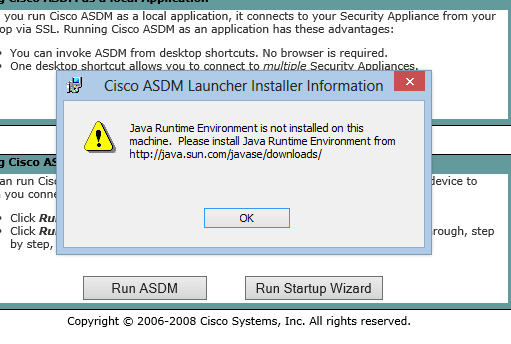
I tried installing several versions of 32 and 64 bit Java and running in compatibility mode. Basically, i settled on using the Java Web Start version, that can be found on the main web portal page. Or it can be launched by using the following link (of course insert your IP address in the first part).
http://YOURIPADDRESS:PORT
/
admin/public/asdm.jnlp
This works fine with Windows 8.